

Here is a comprehensive review of CalibRaw, detailing what it is, who it is designed for, what software it can replace, and the features it offers. It is an exciting new free editing package that might just be suitable for those looking for a Lightroom replacement. Available for Windows, Mac OS and Android, it looks like an interesting prospect!
What is CalibRaw?
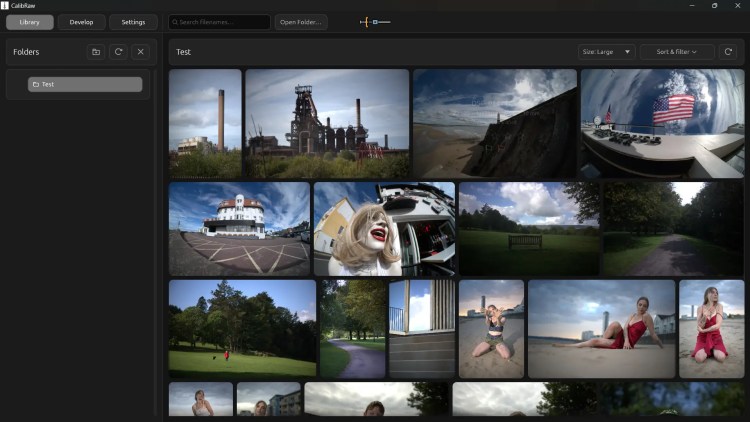
CalibRaw is a free, open-source RAW photo editor and workflow application. Designed with a familiar, modern user interface, it provides standard parametric photo editing tools alongside localized AI processing for non-destructive digital photo development.
It is a small file, and on first load you will get a few settings that it will walk you through. It is all very quick and easy.
Who Is It For?
- Budget-Conscious Photographers: Ideal for hobbyists, enthusiasts, and professionals looking to avoid ongoing Creative Cloud or software subscription fees.
- Privacy-Focused Users: For photographers who prefer local processing over cloud-based AI engines; object removal and local AI adjustments run directly on your hardware without uploading photos to external servers.
- Mobile & Cross-Platform Editors: Users looking for a unified experience across desktop and mobile devices (such as Android) with syncable or portable editing settings.
- Open-Source Enthusiasts: Photographers who favour open-source software transparently hosted on platforms like GitHub.
What Can It Replace?
CalibRaw directly targets subscription-based parametric editors:
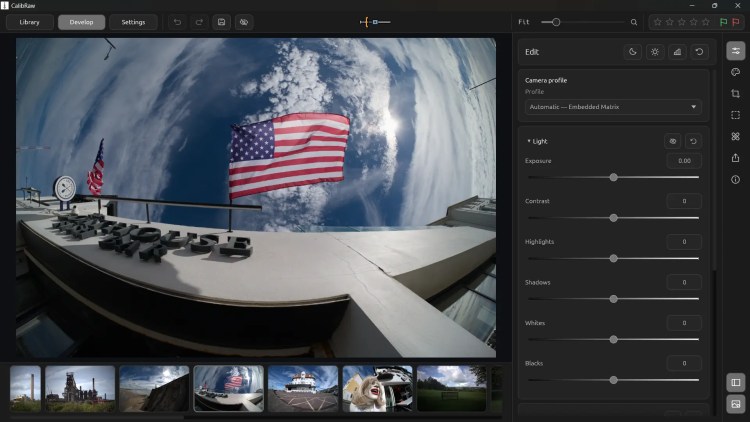
- Adobe Lightroom (Develop & Library Modules): CalibRaw replicates the core layout, slider mechanisms, tone curves, and cataloging workflow of Lightroom Classic and Lightroom CC.
- Lightroom Mobile: Replaces the paid mobile tier on Android/iOS, unlocking preset management, tone adjustments, and masking without requiring a monthly plan.
- Paid Standalone Editors: Functions as an accessible alternative to paid software such as Capture One or ON1 Photo RAW for core image editing and colour correction.

What Features Does It Offer?
1. Essential Image Adjustments
- Exposure & Tone: Full control over Light (Exposure, Contrast, Highlights, Shadows, Whites, Blacks), Tone Curves, and HSL/Colour Mixers.
- Colour Grading & Profiles: Built-in colour grading wheels and profile selection tools.
- Lens Correction & FX: Vignetting, grain, effects, chromatic aberration control, and lens profile application.
2. Smart Masking & Local AI
- Subject & Sky Selection: Automatic detection and masking powered by localized AI.
- Generative/Object Removal: Localized AI object removal tool to clean up unwanted background elements without cloud uploads.
- Denoise & Sharpness: AI-assisted or standard noise reduction routines for high-ISO shots.
3. Workflow & Organization
- Non-Destructive Editing: Original RAW files remain untouched while editing metadata is saved side-by-side or in-database.
- Preset Creation & Batch Edits: Save custom adjustment groups, colour profiles, and mask templates to apply across large image shoots.
- Library Management: Sort and filter assets by capture date, filename, star ratings, flags, and file formats (RAW, JPEG, HEIC, PNG).
Conclusion
2026 has been an amazing time for editing software releases. RapidRaw is leading the pack, while of course we have the recently reviewed ArtCraft Suite and many more free editing packages on the way. The time for paying for software could soon be over!
If you watch my video, you will see me experiencing CalibRaw for the very first time, and I was very impressed with it. Watch the video, as it will give you a really good sense of just where this software is at, and how it should mature into something really nice!
When reviewing software, I tend to only pick the packages that genuinely look like they will do will in the future. And I think that CalibRaw will be one of those programs, so bookmark this website and keep up with all things editing software.
ONECAMERAONELENS.COM – YOUR ONE STOP WEBSITE FOR UNBIASED AND ACCURATE PHOTOGRAPHY RELATED MATERIAL
My name is Mark G Adams and I run Photography By Mark G Adams. I am a professional photographer from South Wales, shooting weddings, events and portraits as well as running meets and workshops. For fun I like to shoot landscapes, wildlife and occasionally do street photography. Enjoy my website as I share my knowledge learned over decades of working and having fun in photography.Feel free to like, comment and subscribe!
You can find all the latest articles and blogs on my homepage here.
My main photography social media page is my Photography By Mark G Adams page.
Nikon Recipes for the Z system can be found here.
You can find a complete list of my gear here.
DOWNLOAD THE LATEST “ADVENTURES IN PHOTOGRAPHY” MAGAZINE FOR FREE HERE
Another one; thanks for the introduction.
I think the more choice we all get the better, but I’m only highlighting the ones with the most potential. Enjoy 🙏
I tried to install Calibraw and run it but as soon as I try to use the masking it just crashes. I have the layest nvidia driver but still no luck.
Would that be the Backdground and Subject masking? Turn the quality (in options) down to low or turn off GPU usage for masks.