Long time readers of this website know that I have been quite the advocate for Darktable over the last decade or more. Darktable is free and open source software that is considerably more powerful than a free photo editing program should be. It is something I have relied on for my “me” images (i.e, not my paid work images), and a program I really enjoy using. But things have changed.
“History”
As mentioned, Darktable has always been my go-to software for just getting things done. Although very complicated (especially when starting out), and with a huge learning curve, over the years I learned and understood the software, and as such I’ve been writing tutorials, doing YouTube videos and helping new users in the community form many years.
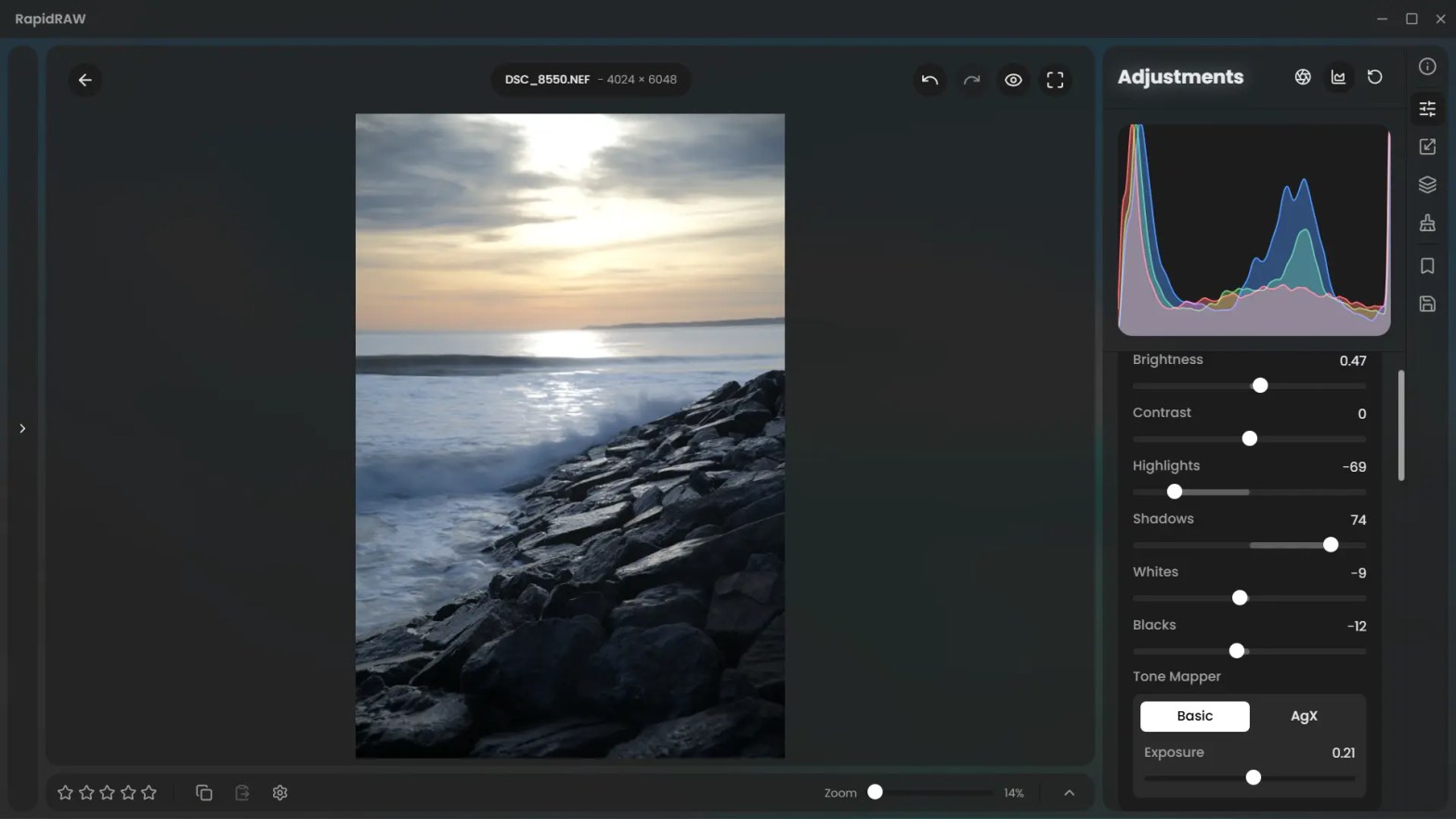
For many years Darktable has been the undisputed king of free and open source software for many people, but recently (as featured a few times on the website), you’ll see I discovered RapidRaw. This is another free piece of software, but it takes a very different approach to Darktable.
As I mentioned, Darktable has always been software I’ve used for me. With RapidRaw, due to its very different approach (concentrating on keeping things familiar, speed and targeting things such as fast and advanced masking etc), that line between the me software and the work software has suddenly almost vanished!
“Why the change”
RapidRaw does what Darktable does, but in a modern way, aimed at people with modern professional workflows with software that delivers results impressive results.
There is no denying that Darktable is powerful, and I have used it for paid work in the past, but when a client needs 500 photographs (or even 50!), each one edited to professional and consistent standards, Darktable is just far too convoluted. Hence, for my paid work I will use Adobe Photoshop or more recently Luminar Neo. The workflow in these software packages is very different. They are obviously paid-for packages that are made for professional photographers. However, this article is not about software that we use for paid work, it’s aimed at those of us who (also) just use software to get the job done for our hobby.
RapidRaw has been built from the ground up to be modern, with a modern outlook on editing. Gone is the need to search on how to use a module because it is so complicated, gone is the need to spend hours learning. You are suddenly in an environment where everything makes sense and everything works as you would expect.
What really stands out on RapidRaw is the masking abilities. What would take me many minutes in Darktable to mask perfectly takes less than a second in RapidRaw, and you have infinite control on refining the mask should there be issues.
Just like the masking, you have complete control of the colours, in a simple and familiar layout that just makes sense. And once you’ve colour graded, you can save your colours quickly as a preset and use them consistently throughout your work.
Detail extraction is more than good enough for most work (although the leader in this field, by a long margin is Luminar Neo, that is incredible!) and again you have complete control.
The cataloguing and rating feature is excellent, so managing your library is as easy as it is in other software too.
“Too good to be true?’
I’m making it sound like RapidRaw is the perfect piece of software. Compared to other free software it certainly punches above its weight! However it’s still early days and there are a few things that are missing or can be improved from RapidRaw 1.5.4.
I don’t use any of the ComfyUI features (because I can’t get them to work), and I don’t actually see anything there that has slowed me down. The inbuilt in-painting does a great job. However, most importantly, RapidRaw is missing some sort of clone tool. Although the clone and removal tools are something I rarely use, not having the option has been a very minor problem (which I easily worked around).
There is still an issue with the black slider that really needs to be looked at, it does now work as it should, but I understand that it is going to be fixed.
In fact, there are a number of “feature fixes” coming in future updates, including the ability to move the vignette, full perspective correction (in addition to the options in the lens module), dynamic range compression and much more.
Finally, the biggest hurdle of course is the prospect that the developer might just stop developing RapidRaw. Although highly unlikely, it is a possibility. That said, even if he pulled away now from the project, he has left us a superb piece of software.
“Is it good enough for paid work?”
This is a very important point for a lot of my readers, as someone who gets paid for my work with weddings, events and portraits (among other things), for most of what needs doing, for professional results, yes, it is good enough.
However, for portraits or close up images of people then you’d be better off with Luminar Neo or other professional software that has dedicated modules for skin retouching.
I will be using it on a number of weddings I have coming up (and maybe even a portrait shoot using it on full length portraits) and I will try and share some of the results, so that will be something for you to look forward to.
“Should I change from Darktable (or whichever free software you use)?”
That my friends, is totally up to you. For many people, being familiar with something you’ve learned over the years might mean you just don’t want to change.
If you are someone who likes to “tinker” then the lack of a million options might make RapidRaw feel too simple for you (although it is anything but simple in its performance and output!)
RapidRaw is free to download, I would suggest downloading the latest versions and give it a go. It’s more than up to the task if whatever you throw at it (it is available for every major platform, including Android!).
“Conclusion”
I feel like I’ve written and discussed RapidRaw a lot lately amongst friends, colleagues, people who are reaching out to me, people I’m tutoring, people online and so-on. I’ve written about it’s updates, and I will continue to follow the software as it matures.
If you want a fast, reliable, powerful piece of software that is being written by someone who loves photography and is listening to feedback on its development, just give it a go. Also, Darktable is still an amazing piece of software, so if even if you do not try RapidRaw, you will still be happy. I still download the nightly updates and try each one out, just to be up-to-speed on the developments (just like I do with many other software packages).
As I wrote recently, “what is the best piece of editing software in 2026?” There you’ll find the answer to this question. And it has been staring you in the face all the time.
“Coming Soon”
I currently have a Facebook Group for RapidRaw users, however I plan to make a dedicated section on this website titled “The RapidRaw Handbook”.
My name is Mark G Adams and I run Photography By Mark G Adams. I am a professional photographer from South Wales, shooting weddings, events and portraits as well as running meets and workshops. For fun I like to shoot landscapes, wildlife and occasionally do street photography. Enjoy my website as I share my knowledge learned over decades of working and having fun in photography.
You can find all the latest articles and blogs on my homepage here.
My main photography social media page is my Photography By Mark G Adams page.
Nikon Recipes for the Z system can be found here.
You can find a complete list of my gear here.
 One Camera One Lens Photography
Nice overview Mark. For a lot of people, moving to something simpler than Darktable, which can be quite complex, will feel like a breath of fresh air, that part makes perfect sense.
It’s a bit of a shame ComfyUI didn’t click for you, because what looks like a small extra feature is actually a whole layer on top of your editor. I wouldn’t dismiss it as “not needed”, more as “not explored yet”. The built-in inpainting is handy, but it’s really just the tip of the iceberg.
Comfy is less a tool and more a system. You’re not clicking fixed buttons like in Photoshop or Luminar, you’re shaping your own workflow, tuned to how you actually work.
For weddings and portrait work, that’s where it starts to matter:
retouching that keeps skin natural and texture intact, no plastic look
removing distractions without the obvious cloned feel
automatic, very precise subject, sky, and background selections
consistent colour grading across a full set without repeating yourself
rescuing difficult shots, noise, underexposure, lost detail
upscaling and detail recovery for prints or tight crops
fixing small composition issues without reshooting
automating workflows across large batches
These are exactly the areas where people usually turn to paid software.
The difference is fairly simple. RapidRaw gives you speed and clarity. Comfy gives you depth and control. Used together, you get very close to what commercial tools offer, but built around your own way of working – I’d even say that, in the right hands and with a bit of setup, it can rival, and sometimes even surpass, commercial tools, though I realise that’s not always an easy claim to accept.
Logically, the real question is whether he even could integrate all of that directly, and even if he can, whether he should. Doing so would likely make the application much heavier, more complex to install, and harder to maintain, which goes against the idea of keeping it fast and accessible. Keeping it external makes a lot more sense, it keeps the core clean, while still allowing those who want more to build on top of it.
It does take a bit of time at the start, mainly setting up models and your first workflows. But it’s not as difficult as it might seem, and you can lean on AI to help you through it. Once that’s in place, it opens up a very different world, and you end up with something that feels a lot like your own custom-built pro toolkit.
I do hope you give it another look at some point.
Oeps, it turned out longer than I wanted 🙂
Have a great day. It’s a bit less pleasant here, rain just started.
All the best,
Marc.
LikeLiked by 1 person
Thanks Marc. Yeah, I’ve watched and read up a lot on ComfyUI, it looks interesting, but I honestly rarely if ever remove things from my images, hence missing the clone tool for occasional use is far more important for me (though the basics inpaint options as they stand down a fantastic job in tests).
I also want to keep it simple for others, as they tend to leave Darktable as it is too complicated, and would not stand a chance with ComfyUI (I’m from a tech background and I can’t get it to work!) and want to push the fact that it works more than perfectly without ComfyUI installed (from a professional standpoint in work that matters), although it’s great that it’s there for those who think that they need it and want to experiment with it.
The developer has said he is slowly getting rid of (or replacing parts of) ComfyUI and getting everything integrated, so that’s going to be
interesting!
Again, thank you, readers always enjoy a great reply it wasn’t too long, don’t worry! Lol
LikeLiked by 1 person
Good points ! and thanks about the reply 🙂
LikeLiked by 1 person
Thanks Marc. Yeah, I’ve watched and read up a lot on ComfyUI, it looks interesting, but I honestly rarely if ever remove things from my images, hence missing the clone tool for occasional use is far more important for me (though the basics inpaint options as they stand down a fantastic job in tests).
I also want to keep it simple for others, as they tend to leave Darktable as it is too complicated, and would not stand a chance with ComfyUI (I’m from a tech background and I can’t get it to work!) and want to push the fact that it works more than perfectly without ComfyUI installed (from a professional standpoint in work that matters), although it’s great that it’s there for those who think that they need it and want to experiment with it.
The developer has said he is slowly getting rid of (or replacing parts of) ComfyUI and getting everything integrated, so that’s going to be
interesting!
Again, thank you, readers always enjoy a great reply it wasn’t too long, don’t worry! Lol
LikeLike